

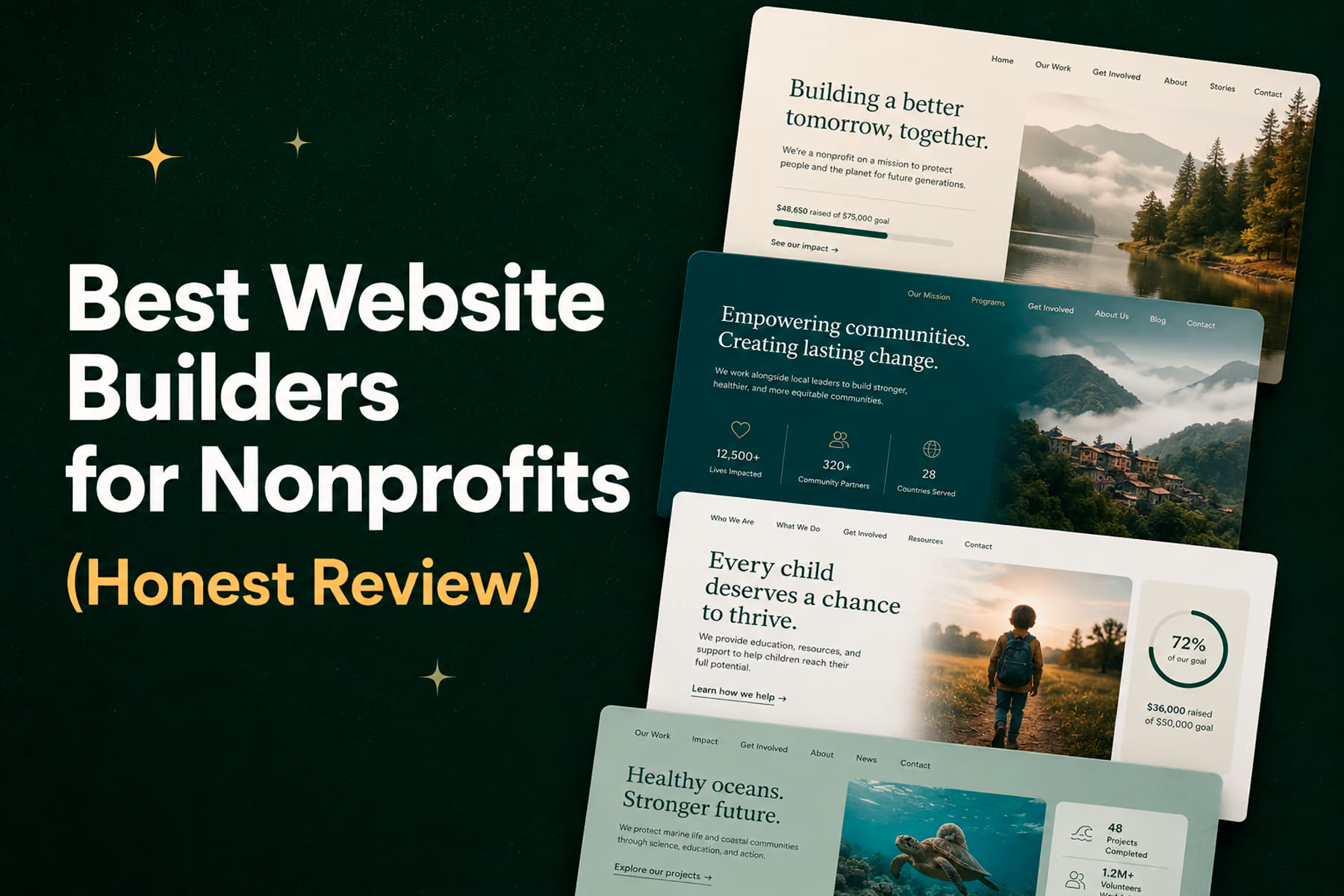
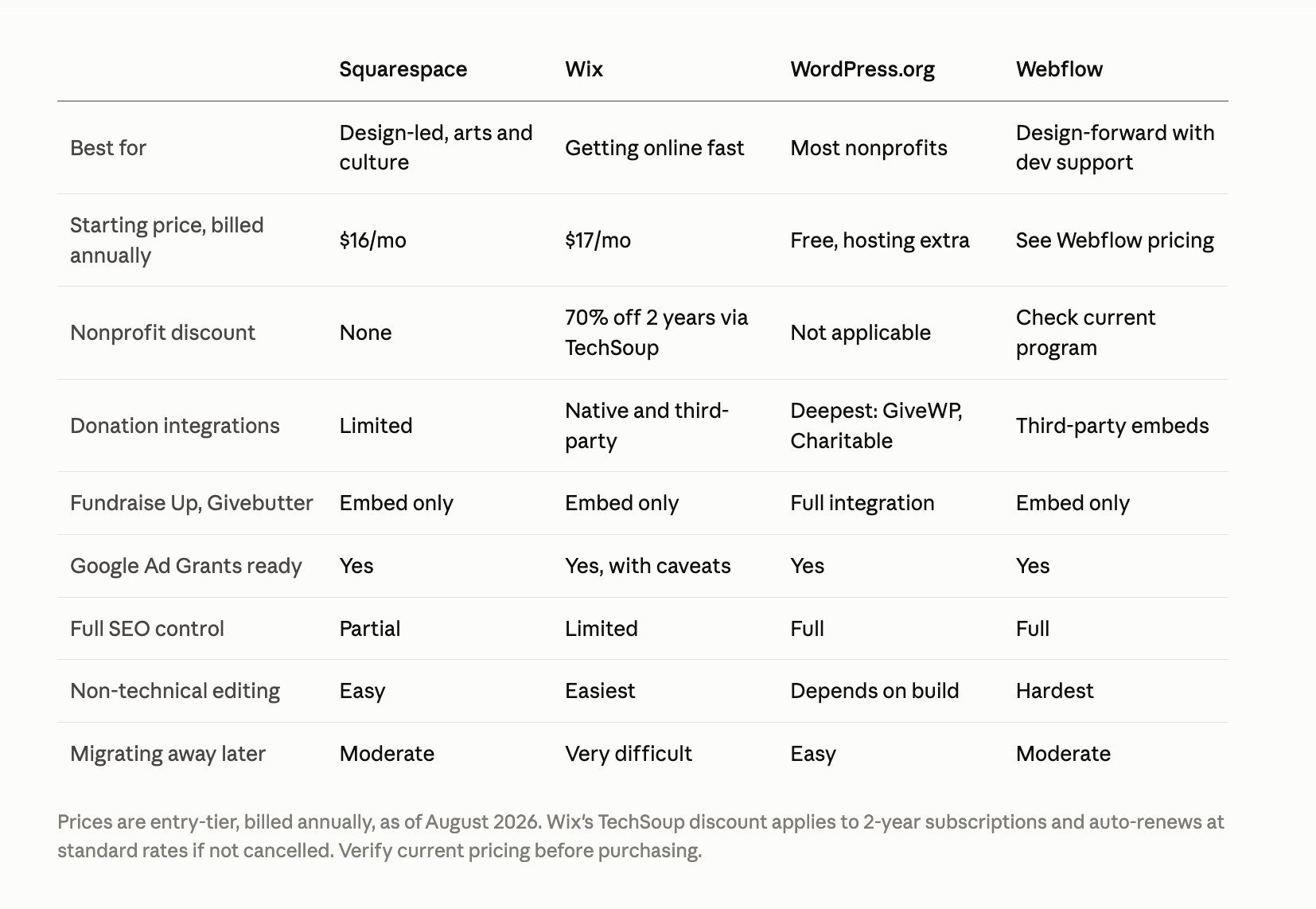
For most nonprofits, WordPress is the right answer — it's the most flexible, the most supported, and the platform most of our clients are already on. If design quality matters more to you than flexibility, choose Squarespace. If you're a small team that needs to be online this week with no technical help, choose Wix. If you have a developer relationship and want the best design control available, choose Webflow.Below is the full comparison, what each platform costs a nonprofit in year one, and the specific signs that you've outgrown a builder entirely.One disclosure before we start: Wandr is a custom design and development agency. We build nonprofit websites from scratch, so we have an obvious incentive to tell you builders aren't good enough. We're going to give you an honest assessment anyway. For plenty of nonprofits, a builder is genuinely the right tool right now.
We've rebuilt donation platforms for WWF-Canada and Mercy For Animals, so the assessments below come from migrations we've actually run, not from spec sheets.
The Honest Case for Website Builders
Website builders have improved dramatically over the past several years. The best ones: Squarespace, Wix, WordPress.com, Webflow, and a few others: can produce genuinely professional results without requiring a developer.
For an early-stage nonprofit with a simple audience, limited budget, and a need to get online quickly, a builder is often the right move. It's also a reasonable interim solution for an organization that knows it needs a custom build eventually but isn't ready for that investment yet.
The key word is interim. Most nonprofits that are actively growing will outgrow a builder. The question is whether they recognize it before the cost of staying on one exceeds the cost of moving off.
What to Look For in a Nonprofit Website Builder
Not all builders are equal for nonprofit use cases. Before comparing platforms, here are the criteria that matter most:
Donation integration quality
Can you integrate with purpose-built donation platforms (Fundraise Up, Givebutter, Donorbox)? Does the integration track conversions properly? Are recurring donations supported?
SEO capabilities
Can you control meta titles and descriptions for every page? Is the URL structure clean? Does the platform allow full control of heading hierarchy? Some builders impose SEO limitations that are hard to work around.
Mobile performance
Does the builder produce genuinely mobile-optimized sites, or just sites that don't break on mobile? Load time on mobile is particularly important.
Content management ease
Someone on your team will be updating this site. Is the editing interface genuinely accessible to non-technical users? Some builders are deceptively difficult to update without template expertise.
Nonprofit discounts and plans
Several major builders offer discounted or free plans for verified nonprofits. This is worth investigating before committing to any platform.
The Major Platforms: Honest Assessments
Squarespace
Best for: Visually-oriented nonprofits, event-based organizations, arts and culture
Strengths:
- Genuinely beautiful templates that produce professional results with minimal effort
- Clean editing interface that most non-technical users can manage
- Good built-in SEO tools
- 50% nonprofit discount on paid plans
Limitations:
- Limited e-commerce and donation integration flexibility compared to WordPress
- Less control over advanced SEO and URL structures
- Not built for complex user flows or multi-audience architecture
- Harder to scale into a complex site
Verdict: Great for a small nonprofit that prioritizes design quality and simplicity over conversion complexity.
Wix
Best for: Small organizations, community groups, simple single-mission nonprofits
Strengths:
- Very low barrier to entry: genuinely drag-and-drop accessible
- Nonprofit-specific features and integrations
- Wix ADI (AI website builder) can produce a starter site extremely quickly
- 50% nonprofit discount available
Limitations:
- Sites built with Wix can be difficult to migrate away from later
- Performance and SEO limitations compared to other platforms
- Less flexibility for complex user flows
Verdict: The most accessible builder for organizations that are truly just getting started, but arguably the hardest to grow beyond.
WordPress (WordPress.org — self-hosted)
Best for: Most nonprofits with some technical capacity or a developer relationship
Strengths:
- By far the most flexible platform in this comparison
- Enormous plugin ecosystem including purpose-built donation plugins (GiveWP, Charitable, WPForms with donation add-ons)
- Full SEO control via Yoast or Rank Math
- Massive developer community means almost any functionality is achievable
- Most of the nonprofits we work with are already on it and want to stay there: for good reason
Limitations:
- Requires hosting, maintenance, and security management (these are non-trivial for non-technical teams)
- Quality varies enormously: a well-built WordPress site is excellent, a poorly-built one is a liability
- Plugin conflicts and update issues require ongoing attention
Verdict: Our most recommended platform for nonprofits, with the caveat that it needs to be set up correctly. Most of the nonprofit clients we work with are on WordPress. We can work with it at any level of complexity.
This isn't theoretical for us. WWF-Canada came to us running their main site on ColdFusion, with a separate store microsite and three separate Living Planet supporter portals, each built at a different time on a different system. We consolidated all four into a single WordPress multisite and rebuilt the mobile donation funnel inside their locked global brand system. Digital donations rose 37%, and campaign launches got roughly three times faster because content changes no longer required a developer.
Mercy For Animals had a similar shape of problem at a different scale: six independent regional sites across the US, Latin America, Brazil, India, and Malaysia, each with its own UX patterns and information architecture. We unified them into one WordPress platform, consolidated more than a dozen bespoke campaign pages into three flexible templates, and migrated 326 pages while preserving over 90% of search equity. Donations rose 32% in year one, and page creation and updates got 78% faster.
Both organizations chose WordPress for the same reason: they needed a platform their own teams could run without opening a developer ticket, and one flexible enough to hold a store, campaign properties, and multiple regions under one roof.
Related: WordPress for Nonprofits: Pros, Cons, and When to Go Custom →
Webflow
Best for: Design-forward organizations, orgs with a developer relationship, organizations that want Webflow's CMS
Strengths:
- Best design control of any builder in this list
- Clean, performant output code
- Strong CMS for content-heavy organizations
- Growing nonprofit ecosystem
Limitations:
- Steeper learning curve than other builders
- More expensive
- Less plugin/integration ecosystem depth than WordPress
- Editing interface can be challenging for non-technical content managers
Verdict: An excellent choice for organizations that prioritize design quality and have the technical sophistication to manage it. We build in Webflow and recommend it for the right clients.
Related: Webflow for Nonprofits: Is It the Right Website Platform? →
Google Ad Grants and Your Platform Choice
Google Ad Grants gives eligible nonprofits $10,000/month in free Google Ads. It's the single largest free marketing resource available to nonprofits, and your platform choice affects whether you can use it well.
The program requires a functioning website with substantive content, valid SSL, no broken links, and landing pages that match ad intent. It also enforces a minimum click-through rate, which means you need the ability to create and iterate on dedicated landing pages quickly.
Platforms with limited page-creation flexibility or constrained URL structures make this harder than it needs to be. If Ad Grants is part of your growth plan, weight SEO control and landing page flexibility heavily in your decision.
Nonprofit Discounts Available in 2026
Several platforms offer meaningful discounts for verified nonprofits. Before paying full price, check:
- Wix: 50% nonprofit discount
- Squarespace: 50% nonprofit discount
- WordPress.com: Has nonprofit-specific plans
- Webflow: Has a nonprofit program (verify current availability)
- Google for Nonprofits: Free Workspace access, which affects hosting and analytics options
Always verify current program availability directly: these programs change.
The Question You Should Actually Be Asking
"Which website builder is best?" is actually the wrong starting question.
The right question is: "What does my organization need its website to do, and what's the simplest tool that can do that reliably?"
If the answer is "get online with basic information and a way to accept donations": use a builder. Pick Squarespace or Wix if design simplicity matters most. Use WordPress if you want flexibility.
If the answer involves multiple distinct user types, complex donation flows, SEO as a growth channel, or a platform migration from an existing site: that conversation is usually pointing toward custom work, or at minimum toward a well-configured WordPress setup with expert development.
Related: Nonprofit Website Builder vs. Custom Design: Which Is Right for You? →
When You've Outgrown a Builder
Here are the signs it's time to move beyond a builder:
Your donation integration breaks or reports incorrectly. Your team spends more time working around the platform's limitations than managing the mission. Your SEO has plateaued and you can't address the root cause within the builder's constraints. You've outgrown the template's architecture and can't restructure it to serve your audience. The design no longer reflects the credibility of your organization.
The most common version we see isn't dramatic. It's fragmentation. An organization adds a store, then a campaign microsite, then a supporter portal, each built at a different time on whatever tool was convenient. WWF-Canada was running four separate systems by the time we came in. Mercy For Animals had six. In both cases supporters met a different organization depending on which door they entered through, and internal teams duplicated work across properties.
The second most common version is mobile. When we audited WWF-Canada, mobile carried 34.7% of their traffic but generated CA$7,035 against desktop's CA$45,906, bouncing at 75% with 49-second sessions. Their fastest-growing surface was their weakest one. With Mercy For Animals, analysis surfaced a 90% drop-off at the primary donation decision point. That isn't apathy. It's architecture. People who had already decided to give were leaving before they finished.
When any of these become true, the cost of staying on the builder is usually higher than the cost of moving. It's just harder to see, because it shows up as missed donations rather than as a line item.
Book a free diagnostic to see whether you're ready for a custom build →
Wandr Studio builds custom nonprofit websites on WordPress, Webflow, and custom platforms. See our services →